
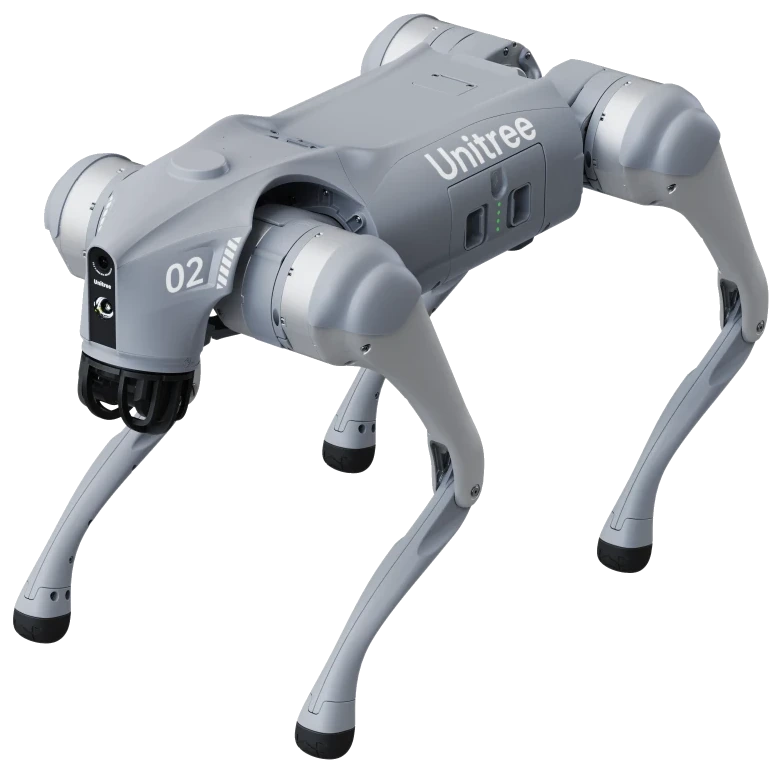
Choosing between legs and wheels
Buying a Unitree Go2 begins with choosing the legged platform or the Go2-W with wheels on its feet. Both belong to the same product family, but the version matters to your application. Existing Go2-W information describes greater speed and efficiency on hard surfaces. This does not mean every Go2 characteristic applies to every Go2-W. Compare the version with the environment in which you want to investigate movement, control or an inspection task. Record whether your focus is software development, education, demonstrations or collecting measurements. The product page brings together versions and options, helping you turn a family name into a specific platform for your question rather than assuming identical equipment across the range.
Distinguishing Go2 Air, Pro and EDU
Versions on the Go2 page include Air, Pro, Max, Go2-X and several EDU levels. Air lists features including 3D LiDAR and a wide-angle camera. The Pro description adds computing capabilities, voice interaction and intelligent following, among other features. For education and research, EDU Standard, Smart, Plus and Ultimate are relevant: existing information describes a full SDK and increasing computing, sensing and LiDAR capabilities. These names do not justify treating every option as included as standard. Check which development access and equipment the intended version actually describes. Gas-detection and screen-controller configurations are also listed as separate packages. They require their own comparison with the measurement task or control interface you want to develop, rather than assumptions based on the general family description.
Go2-W and inspection requirements
For Go2-W, the range lists Standard, Smart, Plus, Ultimate and Inspection. Smart adds computing and sensing; Plus describes additional LiDAR for mapping and obstacle avoidance. Inspection includes options for camera packages and a dual-spectrum gimbal. An inspection enquiry therefore involves more than mobility: consider the data you need and the equipment required to collect it. An educational project may instead centre on software access and comparing control methods. Specify the intended version, then review its accessories on the product page. The education and research article and the robot-dog comparison help you assess development platform, sensors and application separately. They do not establish that every package is automatically suitable for every inspection task or that all listed sensing options are included.
Advice and selection
Advice here means first making the application clear. Selection then means comparing the described platform features and versions with that application. For a humanoid, consider development and manipulation; for a robot dog, mobility, sensors and protection. For an EDU version, check SDK access, computing power and secondary development options. The range contains several levels, so a family name does not settle every choice. Also identify the accessories and equipment you want to connect. This keeps the distinction between a base robot and the requested configuration visible. Existing pages support this comparison without treating an optional module as an automatically included component or presenting a general model description as the complete project specification.
Starting price and configuration
Below you will find the same starting price as on the product page. The asterisk refers to the existing conditions at the bottom of the article. Configuration, accessories and optional additions determine the package and therefore the final price. An EDU version, different hands, sensors or computing modules should not simply be equated with the base platform. First compare what your project requires and which components belong to the intended version. Industrial configurations receive a quote on request. The starting price is an orientation point, not a price promise for every version or for a fully integrated application at your location.
- Unitree GO2From € 3.995 excl. VAT*
Align integration, training and service
Umotion’s existing services include integration, training and service. Discuss these subjects alongside configuration: what hardware should connect, what software do you intend to develop and how does the robot relate to the process? A product page describes the platform, not automatically the complete implementation at your location. The same boundary applies to a starting price: it is not an industrial project budget. Use the G1, education and inspection articles to organise your questions. Specify the model and the support you want to discuss when enquiring. The conversation can then concern the intended package and application rather than assumptions about included components, performance or a complete solution based only on a product name.